NOTE: Source Code available for download at the bottom of the page
What is Spring-WS?
Spring-WS stands for Spring Web Services. Spring-WS focuses on document driven Web Services i.e. Contract-first development approach. Spring-WS aims at providing the best features of Web services along with the proven features of Spring like dependency injection, powerful mappings, support to ws-security etc..
What are it's adavatages?
Powerful Mapping - Provides support to process incoming XML requests based on the message payload.
XML API support - Support to DOM, SAX, JDOM, dom4j etc..
XML marshalling - Supports JAXB, Castor, XStream
WS-Security
Let's see how to implement Contract First Web Service using Spring-WS
What's needed?
Overall design
End Output:
Setup Eclipse Project
To get started, lets use maven archetype
"spring-ws-archetype" which will create the necessary project structure and files for us.
You can create the project either from Command Window or Eclipe WTP
Option 1 : From Command Window
mvn archetype:create -DarchetypeGroupId=org.springframework.ws
-DarchetypeArtifactId=spring-ws-archetype
-DarchetypeVersion=2.1.4.RELEASE
-DgroupId=com.visionjava
-DartifactId=EmployeeEnrollmentWSContractFirst
Option 2: From eclipse WTP:
"spring-ws-archetype" is not available by default so we will have to add this new archetype as shown below:
File -> New -> Other -> Expand Maven -> Select Maven Project -> Next
Add
"spring-ws-archetype" to the repository.
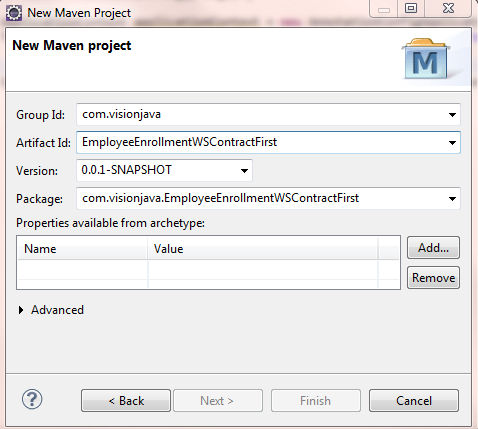
Provide archetype details :
Archetype Artifact Id: spring-ws-archetype
Archetype Version: 2.1.4.RELEASE
Create Project:
Following Steps summarize the process for creating the Spring-WS contract first web service.
Step 1: Create Employee XSD which will define our request and response xml structure.
Employee.xsd
<xs:schema xmlns:xs="http://www.w3.org/2001/XMLSchema"
elementFormDefault="qualified"
targetNamespace="http://www.visionjava.com/employee"
xmlns:employee="http://www.visionjava.com/employee">

    <xs:element name="EmployeeRequest" >
    	<xs:complexType>
    		<xs:attribute name="employeeId" use="required" type="xs:integer" />
    		<xs:attribute name="firstName" use="required" type="xs:NCName" />
    		<xs:attribute name="lastName" use="required" type="xs:NCName" />
    		<xs:attribute name="dob" use="required" type="xs:date" />
    		<xs:attribute name="placeOfBirth" use="required" type="xs:NCName" />
    	</xs:complexType>
    </xs:element>

    <xs:element name="EmployeeResponse" >
    	<xs:complexType>
    		<xs:attribute name="result" use="optional" type="xs:NCName" />
    	</xs:complexType>
    </xs:element>
</xs:schema>
What have we accomplished?
Step 2: Generate stubs from the XSD declared above using XJC through build file.
build.xml
<project name="Ant-Generate-Classes-With-JAXB2" default="generate" basedir=".">
	<property name="src.dir" location="src" />
	<property name="java.dir" location="src/main/java" />
	<property name="schema.dir" location="${src.dir}/main/webapp/WEB-INF" />
	<target name="generate">
		<exec executable="xjc">
			<arg line=" -d ${java.dir} -p com.visionjava.generatedStubs ${schema.dir}/employee.xsd" />
		</exec>
	</target>
</project>
What have we accomplished?
Generated Stubs from XSD
Step 3: Write End Point and the method which will process the request.
EmployeeEndPoint.java
package com.visionjava.endPoints;

import org.springframework.ws.server.endpoint.annotation.Endpoint;
import org.springframework.ws.server.endpoint.annotation.PayloadRoot;
import org.springframework.ws.server.endpoint.annotation.RequestPayload;
import org.springframework.ws.server.endpoint.annotation.ResponsePayload;

import com.visionjava.generatedStubs.EmployeeRequest;
import com.visionjava.generatedStubs.EmployeeResponse;

@Endpoint
public class EmployeeEndPoint {

	@PayloadRoot(localPart="EmployeeRequest", namespace="http://www.visionjava.com/employee")
	public @ResponsePayload EmployeeResponse  employeeEnrollment(@RequestPayload EmployeeRequest employeeData){
		EmployeeResponse response = new EmployeeResponse();
		response.setResult("Success");
		return response;
	}

}
What have we accomplished?
Step 4: Update "spring-ws-servlet.xml" to generate Dynamic wsdl from XSD.
spring-ws-servlet.xml
<?xml version="1.0" encoding="UTF-8"?>
<beans xmlns="http://www.springframework.org/schema/beans"
   xmlns:xsi="http://www.w3.org/2001/XMLSchema-instance" xmlns:sws="http://www.springframework.org/schema/web-services"
   xmlns:context="http://www.springframework.org/schema/context"
   xsi:schemaLocation="http://www.springframework.org/schema/beans http://www.springframework.org/schema/beans/spring-beans-3.0.xsd
       http://www.springframework.org/schema/context http://www.springframework.org/schema/context/spring-context-3.0.xsd
       http://www.springframework.org/schema/web-services http://www.springframework.org/schema/web-services/web-services-2.0.xsd">

	<context:component-scan base-package="com.visionjava" />
	<sws:annotation-driven />

	<sws:dynamic-wsdl id="employeeEnrollment" portTypeName="EmployeePort"
		locationUri="/employeeEnrollmentService" targetNamespace="http://www.visionjava.com/employee">
		<sws:xsd location="/WEB-INF/Employee.xsd" />
	</sws:dynamic-wsdl>


</beans>
What have we accomplished?
Publishing the WSDL to be accessible by the outside world.
There are multiple ways you can tell Spring how to expose the wsdl to the outside world. In our example, we created xsd elements, thus defining the building blocks of communication. We will expose the WSDL dynamically using the Spring built in function to read the XSD and generate the WSDL as shown below:
	        <sws:dynamic-wsdl id="employeeEnrollment" portTypeName="EmployeePort"
		locationUri="/employeeEnrollmentService" targetNamespace="http://www.visionjava.com/employee">
		<sws:xsd location="/WEB-INF/Employee.xsd" />
	</sws:dynamic-wsdl>
Step 5: Update "web.xml" to take absolute path and not relative path for the end point.
web.xml
<?xml version="1.0" encoding="UTF-8"?>
<web-app xmlns="http://java.sun.com/xml/ns/j2ee" xmlns:xsi="http://www.w3.org/2001/XMLSchema-instance"
         xsi:schemaLocation="http://java.sun.com/xml/ns/j2ee http://java.sun.com/xml/ns/j2ee/web-app_2_4.xsd"
         version="2.4">

    <display-name>Archetype Created Web Application</display-name>

    <servlet>
        <servlet-name>spring-ws</servlet-name>
        <servlet-class>org.springframework.ws.transport.http.MessageDispatcherServlet</servlet-class>
        <init-param>
			<param-name>transformWsdlLocations</param-name>
			<param-value>true</param-value>
	</init-param>
    </servlet>

    <servlet-mapping>
        <servlet-name>spring-ws</servlet-name>
        <url-pattern>/*</url-pattern>
    </servlet-mapping>

</web-app>
We use
<init-param>
	<param-name>transformWsdlLocations</param-name>
	<param-value>true</param-value>
</init-param>
to provide the complete uri location in wsdl rather than the relative path.
pom.xml
<?xml version="1.0" encoding="UTF-8"?>
<project xmlns="http://maven.apache.org/POM/4.0.0" xmlns:xsi="http://www.w3.org/2001/XMLSchema-instance"
         xsi:schemaLocation="http://maven.apache.org/POM/4.0.0 http://maven.apache.org/maven-v4_0_0.xsd">
    <modelVersion>4.0.0</modelVersion>
    <groupId>com.visionjava</groupId>
    <artifactId>EmployeeEnrollmentWS</artifactId>
    <packaging>war</packaging>
    <version>0.0.1-SNAPSHOT</version>
    <name>EmployeeEnrollmentWS Spring-WS Application</name>
    <url>http://www.springframework.org/spring-ws</url>
    <build>
        <finalName>EmployeeEnrollmentWS</finalName>
        <plugins>
            <plugin>
                <artifactId>maven-compiler-plugin</artifactId>
                <configuration>
                    <source>1.7</source>
                    <target>1.7</target>
                </configuration>
            </plugin>
            <plugin>
                <groupId>org.codehaus.mojo</groupId>
                <artifactId>tomcat-maven-plugin</artifactId>
                <version>1.1</version>
            </plugin>
        </plugins>
    </build>
    <dependencies>
        <dependency>
            <groupId>org.springframework.ws</groupId>
            <artifactId>spring-ws-core</artifactId>
            <version>2.1.4.RELEASE</version>
        </dependency>
    </dependencies>
</project>
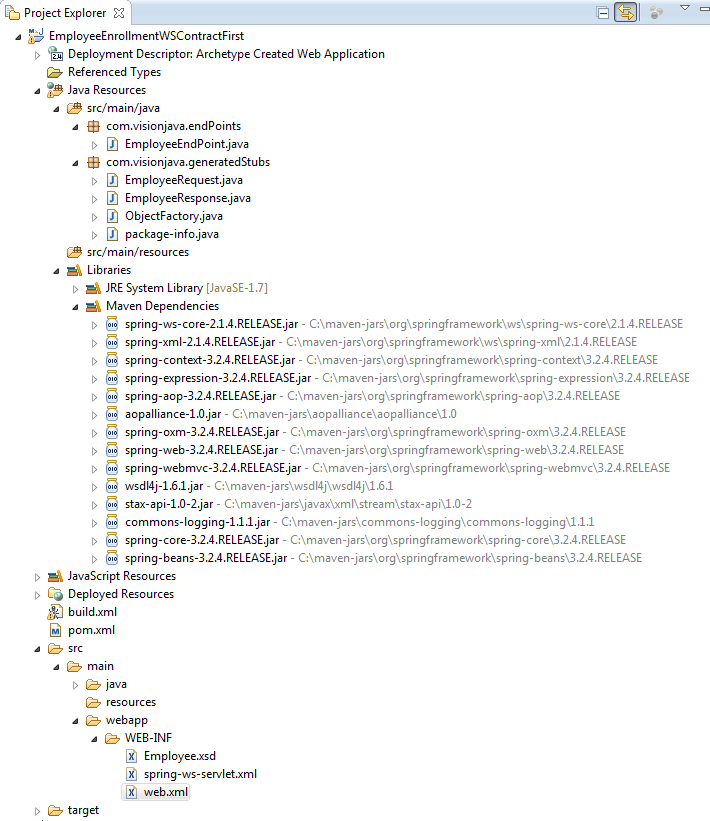
Project Structure:
|