What are we going to learn ?Integrating tomcat into eclipse using Eclipse Server Adapter
How ?
Step 1 : Open Eclipse and change the perspective to JEE.
Step 2 : Click the servers tab and add click on create "Create New Server" as shown below. You should see a new window for New server.
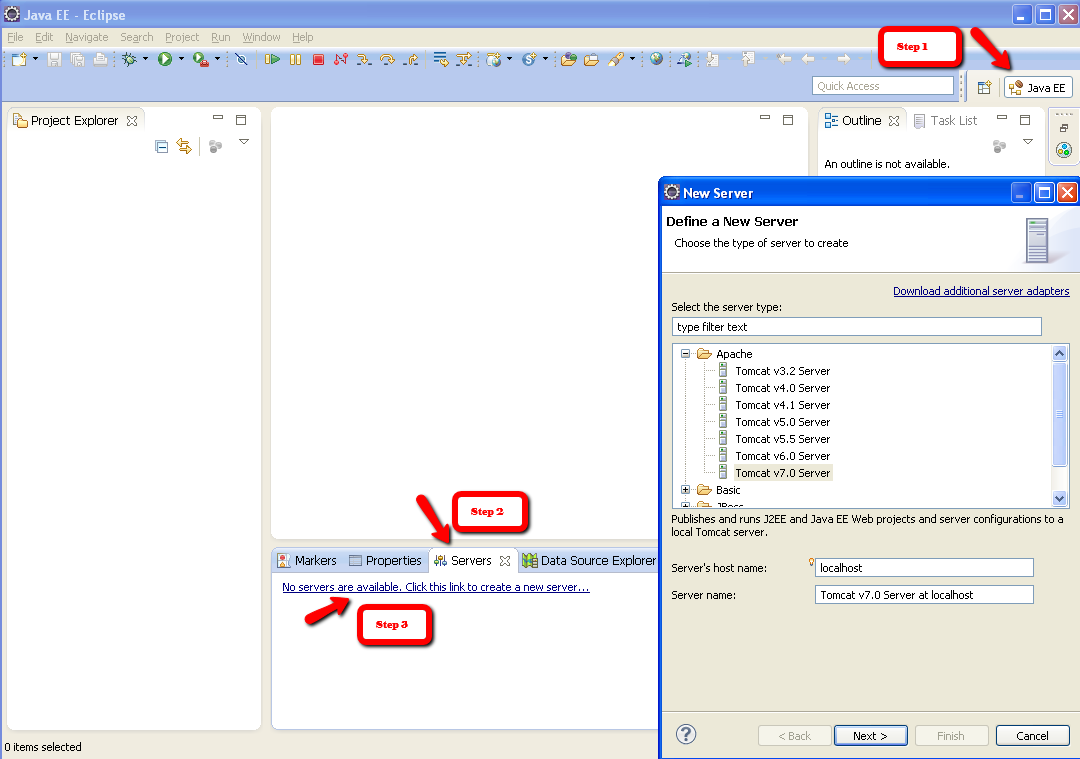
Step 3 : Expand Apache and select the Tomcat Version
Step 4: In the next step, select the installation directory of your tomcat as shown below. Click Finish.
That's it !

Step 5: Before you start using the server, there are couple of things you should do.
Double click the newly created server and it opens the Server Overview Window.
Under Server Locations,
Choose "Use Tomcat installation"
Change the Deploy Path to webapps directory of your tomcat installation.
By choosing the above selections, you can control the server as you would do through a standalone Tomcat server.
By changing the deploy path, your published applications would appear under List of Applications under your tomcat manager console
|


