Creating maven web project and deploy to tomcat.
How?
By using maven commands in command prompt.
Creating Maven Web Project from command prompt.
In Command prompt, navigate to your work space and run the following command.
mvn archetype:generate -DgroupId=com.visionjava -DartifactId=MavenWebProject -DarchetypeArtifactId=maven-archetype-webapp -DinteractiveMode=false
GroupId is the package structure and artifactId is the project name to be created.
C:\workspace-kepler>mvn archetype:generate -DgroupId=com.visionjava -DartifactId=MavenWebProject -DarchetypeArtifactId=maven-archetype-webapp -DinteractiveMode=false
[INFO] Scanning for projects...
[INFO]
[INFO] ------------------------------------------------------------------------
[INFO] Building Maven Stub Project (No POM) 1
[INFO] ------------------------------------------------------------------------
[INFO]
[INFO] >>> maven-archetype-plugin:2.2:generate (default-cli) @ standalone-pom >>>
[INFO]
[INFO] <<< maven-archetype-plugin:2.2:generate (default-cli) @ standalone-pom <<<
[INFO]
[INFO] --- maven-archetype-plugin:2.2:generate (default-cli) @ standalone-pom ---
[INFO] Generating project in Batch mode
[INFO] ----------------------------------------------------------------------------
[INFO] Using following parameters for creating project from Old (1.x) Archetype: maven-archetype-webapp:1.0
[INFO] ----------------------------------------------------------------------------
[INFO] Parameter: groupId, Value: com.visionjava
[INFO] Parameter: packageName, Value: com.visionjava
[INFO] Parameter: package, Value: com.visionjava
[INFO] Parameter: artifactId, Value: MavenWebProject
[INFO] Parameter: basedir, Value: C:\workspace-kepler
[INFO] Parameter: version, Value: 1.0-SNAPSHOT
[INFO] project created from Old (1.x) Archetype in dir: C:\workspace-kepler\MavenWebProject
[INFO] ------------------------------------------------------------------------
[INFO] BUILD SUCCESS
[INFO] ------------------------------------------------------------------------
[INFO] Total time: 12.969s
[INFO] Finished at: Fri Dec 20 13:37:39 EST 2013
[INFO] Final Memory: 8M/25M
[INFO] ------------------------------------------------------------------------
mvn eclipse:eclipse -Dwtpversion=2.0
This will convert it to dynamic web project.
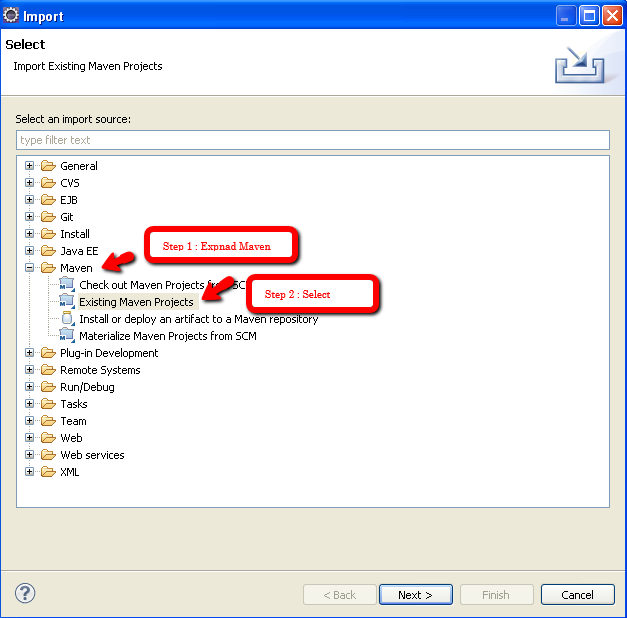
Import the project into eclipse through
File -> Import -> Maven -> Existing Maven Project
After Finish the project should be visible in your work space.
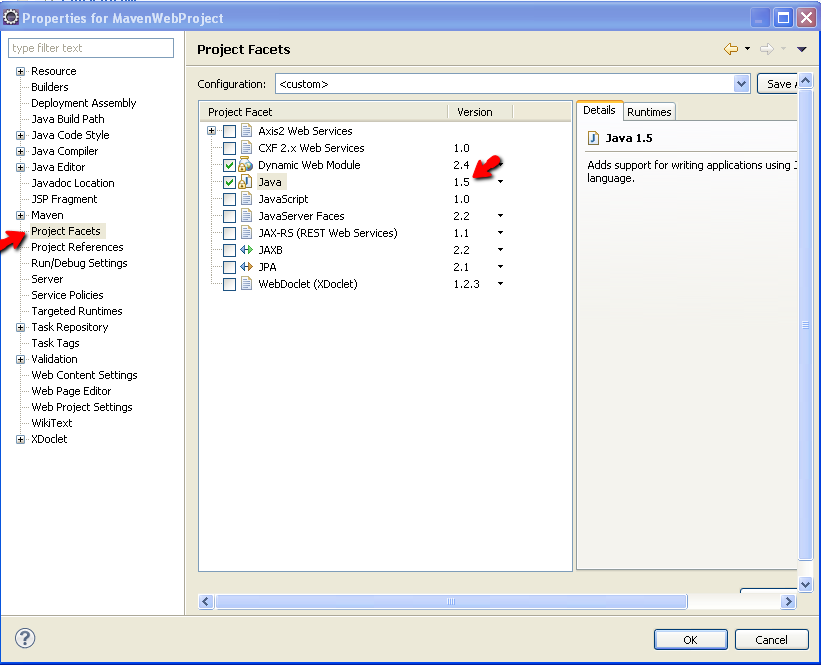
Project -> Properties ( Alt + Enter ) -> Project Facets -> Change Javaversion / Add Dynamic Web Module
Then Right Click on the project -> Maven -> Update Project ( Alt + F5 )
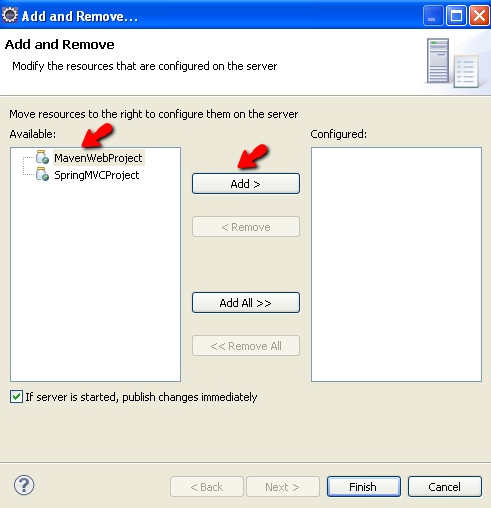
Go to JEE perspective in eclipse and deploy the application as shown below
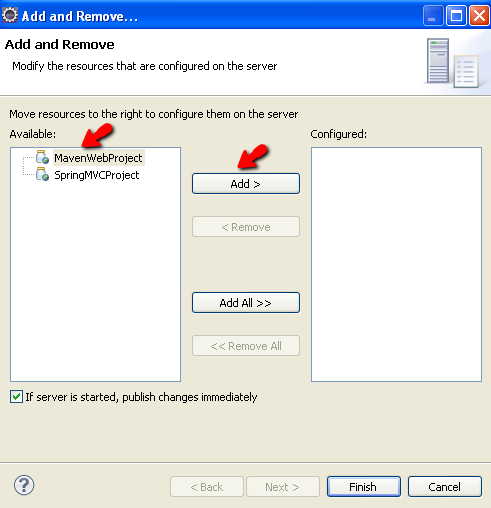
On Finish, the project is deployed to the tomcat server. The application can be published for new changes and removed using "Publish" and "Remove" options.
|